
Monitor Windows services with PowerShell
Schedule a PowerShell script to monitor local services in your Windows Server environment
Technical SysOps blog, where topics include Sysadmin, DevOps, computers, servers, web, MySQL, database, virtualization, optimization and security
Technical SysOps blog, where topics include Sysadmin, DevOps, computers, servers, web, MySQL, database, virtualization, optimization and security
Schedule a PowerShell script to monitor local services in your Windows Server environment
To get and set File Server Resource Manager NTFS quota you now have to use PowerShell FileServerResourceManager cmdlets. It's pretty easy to get directory information with Get-FsrmQuota and change dirquota.exe using Set-FsrmQuota.
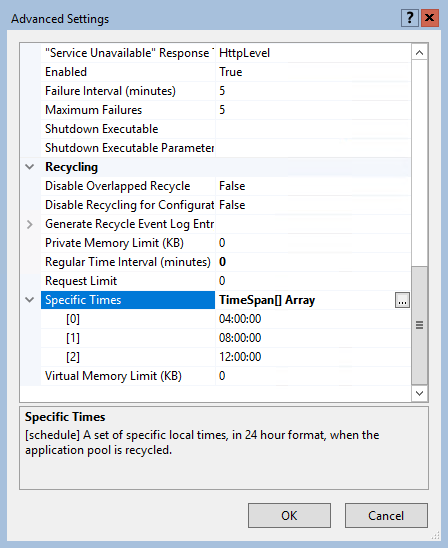
By default, an IIS application pool (or "AppPool") recycles on a regular time interval of 1740 minutes, or 29 hours. One reason for this time interval is that application pools don't recycle at the same moment every day (every day at 07.00 for example).

A change in PHP's default_charset php.ini setting causes HTML output to break if you try to set a different charset in your HTML head. It also might break functions like htmlentities() and htmlspecialchars().

Learn how to turn off swap in Bash, because when a swap partition is enabled Linux starts swapping, which may degrade (MySQL) system performance

Here is how to install software packages during a Windows Deployment Services (WDS) deployment, without Microsoft Deployment Workbench (available in the Microsoft Deployment Toolkit, or MDT).

In this post you’ll learn about setting up a Monit monitoring service for your websites…

PC retrogaming how-to for 64-bit Windows - and Linux!
Sometimes you need to find all files owned by a specific user, recursively on your Windows Server NTFS file system. PowerShell has some neat cmdlets to automate this task for you and here is how.

With thousands spam reactions, disabling (and removing) WordPress comments is often the only way to go. Here is how to disable WordPress comments in both the WordPress Dashboard interface and in your MySQL / MariaDB database.

Over time, as your Windows Server runs longer, more and more disk space is eaten. Simply gone! Investigating the disk usage leaves you clueless; there are no large log files, crash dumps, or there is no software to be removed. Where did that space go?

ECN is an optional feature that may be used between two ECN-enabled endpoints when the underlying network infrastructure also supports it. Unfortunately, having one ECN Capability enabled endpoint may slow down outbound network connections to outdated network equipment.


![[HttpException (0x80004005): The length of the URL for this request exceeds the configured maxUrlLength value.]](https://cdn.saotn.org/wp-content/uploads/2025/06/Length_of_URL_for_request_exceeds_maxUrlLength_value-11-150x150.png)

