WordPress Plugin
Clear PHP opcode caches before WordPress Updates: ease the updating process
WordPress core-, plugin- and theme updates sometimes fail because of enabled opcode caches in PHP. Popular PHP opcode caches are OPcache, WinCache and APC. This little WordPress Must Use Plugin tries to flush opcode caches. Making your live a bit easier when updating WordPress Core, Plugins and Themes.
Optimize WordPress MySQL tables through Cron, behind the scenes
Schedule WordPress database optimization with WP-Cron.
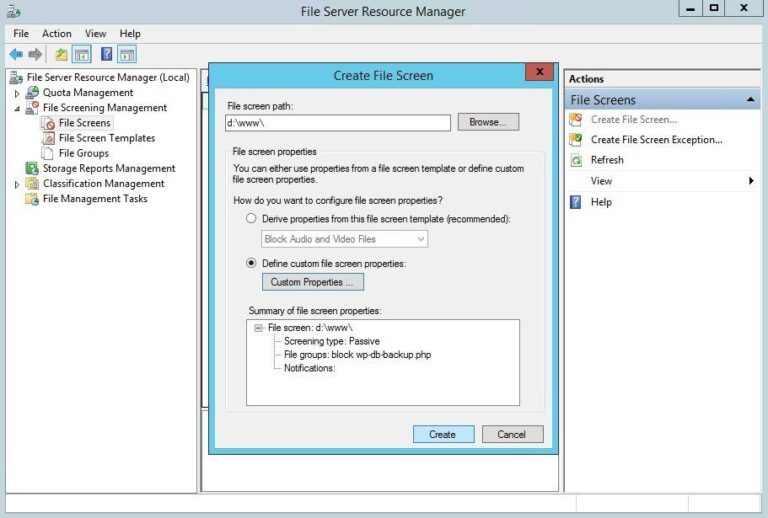
Deny vulnerable WordPress plugins using Windows Server File Server Resource Manager’s File Screens
Using Windows Server File Server Resource Manager‘s File Screens you can block vulnerable WordPress plugins from being uploaded to your IIS web server. In the following example, you'll learn how to block WP DB Backup plugin system-wide on Windows Server, read on…
Install Elasticsearch on CentOS 6.7
How to install Elasticsearch on CentOS 6.7. Elasticsearch is a highly scalable open-source full-text search and analytics engine. It allows you to store, search, and analyze big volumes of data quickly and in near real time.
Minify WP-Super-Cache HTML cache files: WPSCMin a WP-Super-Cache plugin
The WordPress WP-Super-Cache cache plugin doesn't minify HTML cache files, which I find a disadvantage. Knowing minify libraries, I went looking for an existing solution (why reinvent the wheel?), and found one: WPSCMin. Read on ...
Cleanup WordPress post revisions
Clean up WordPress post revisions easily with one (1) simple SQL statement. Delete WordPress post revisions, turn them off and speed up your WordPress blog.