
Skip to content
No results
  • Sysadmins of the North
    • About
    • Donate & Support Sysadmins of the North
  • Codebase
  • GNU/Linux
  • Useful
  • Web applications
    • WordPress
  • Windows Server

Forgot Password?

← Back to login
Login
Logo Sysadmins of the North website
  • Sysadmins of the North
    • About
    • Donate & Support Sysadmins of the North
  • Codebase
  • GNU/Linux
  • Useful
  • Web applications
    • WordPress
  • Windows Server
Logo Sysadmins of the North website
Anime Dude with Retro-futuristic Jetpack Soaring Above Neon-lit Cityscape
  • WordPress

Remove Jetpack email sharing service

Remove Jetpack email sharing service using WordPress plugin or theme functions.php file. It's often abused by spammers

  • Jan ReilinkByJan Reilink
  • On19-05-2017
Read MoreRemove Jetpack email sharing service
a red window with bars on a stone wall
  • Windows Server

What are 4 important security measures for Windows Server & IIS 10?

In this post I address four (4) important actionable security measures for your servers running Windows Server (AD DS, DFS, IIS) and RDP.

  • Jan ReilinkByJan Reilink
  • On15-05-2017
  • 1 Comment
Read MoreWhat are 4 important security measures for Windows Server & IIS 10?
Windows Server logo
  • Windows Server

How to disable SMBv1 in Windows 10 and Windows Server

It is urged you disable SMBv1 in your Windows variant (Windows 10, 8.1, Server 2016, 2012 R2), and here is how if you haven't done so yet.

  • Jan ReilinkByJan Reilink
  • On13-05-2017
Read MoreHow to disable SMBv1 in Windows 10 and Windows Server
PowerShell 5.0 logo
  • Windows Server

Detect ethernet network speed in Windows

Being able to detect the ethernet network speed using PowerShell or WMI is perfect for Windows Server Core. If you ever need to lookup the speed of your ethernet network card in Windows, on the command-prompt, use one of the following PowerShell / WMIC commands.

  • Jan ReilinkByJan Reilink
  • On12-05-2017
Read MoreDetect ethernet network speed in Windows
"I trust you"
  • WordPress

Check WordPress Core files integrity

Check WordPress integrity and verify WordPress Core files' md5 checksums against WordPress' checksums API, using this standalone PHP file.
  • Jan ReilinkByJan Reilink
  • On16-12-2016
  • 1 Comment
Read MoreCheck WordPress Core files integrity
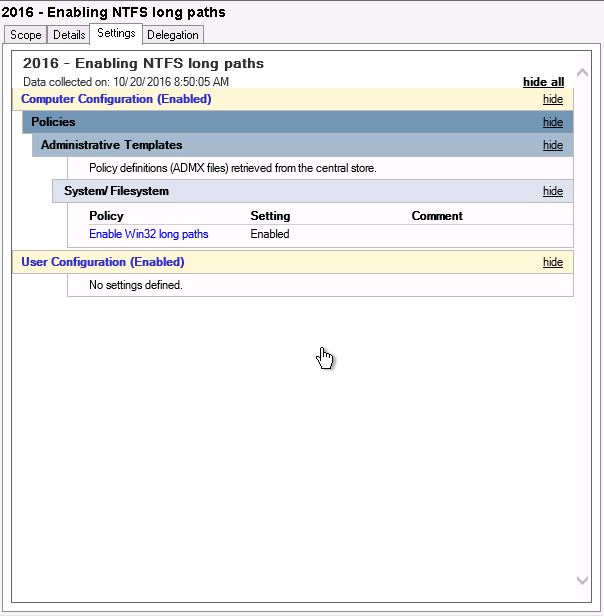
Enable Win32 long paths through GPO in Windows Server
  • Windows Server

Enable NTFS long paths through GPO in Windows Server

Windows Server 2016 was finally released last week, meaning we can finally lift the idiotic 260 characters limitation for NTFS paths. For this, you use a GPO or Group Policy Object in Windows Server.

  • Jan ReilinkByJan Reilink
  • On20-10-2016
  • 2 Comments
Read MoreEnable NTFS long paths through GPO in Windows Server
wasp on blooming white flower
  • WordPress

Clear PHP opcode caches before WordPress Updates: ease the updating process

WordPress core-, plugin- and theme updates sometimes fail because of enabled opcode caches in PHP. Popular PHP opcode caches are OPcache, WinCache and APC. This little WordPress Must Use Plugin tries to flush opcode caches. Making your live a bit easier when updating WordPress Core, Plugins and Themes.

  • Jan ReilinkByJan Reilink
  • On19-10-2016
Read MoreClear PHP opcode caches before WordPress Updates: ease the updating process
a laptop computer sitting on top of a table
  • WordPress

Tips to speed up WordPress, serve gzip compressed static HTML files

Gzip compress and serve WP-Super-Cache or Cache Enabler static HTML files, to supercharge your WordPress blog!

  • Jan ReilinkByJan Reilink
  • On05-09-2016
  • 1 Comment
Read MoreTips to speed up WordPress, serve gzip compressed static HTML files
Lego security officer keeping your sites secure
  • WordPress

Akal Premium WordPress theme XSS vulnerability

This post describes the Akal premium WordPress theme Cross Site Scripting (XSS) vulnerability. If you use this theme, delete it immediately!

  • Jan ReilinkByJan Reilink
  • On22-08-2016
  • 2 Comments
Read MoreAkal Premium WordPress theme XSS vulnerability
a row of trash cans sitting on top of a sidewalk
  • Windows Server

Free up disk space in Windows Server – 5 extra methods

In this post I provide you with 5 ways to cleanup files and free up disk space in Windows Server 2016 (and older / newer Windows Server version), without using the Disk Cleanup Utility. Reclaim lots of lost gigabytes easy. Disk space usage is still an issue in Windows Server.

  • Jan ReilinkByJan Reilink
  • On16-08-2016
  • 3 Comments
Read MoreFree up disk space in Windows Server – 5 extra methods
Prev1 … 5 6 7 8 9 10 11 … 15Next
No more posts to load

Most read

DevOps/SysOps Infrastructure as a Service flow

Windows 11 and WSL 2 DevOps environment

2022-08-15
a rusted iron gate with a chain hanging from it

Test SMTP authentication and StartTLS

2014-05-17
Start Internet Information Services (IIS) Manager as Administrator

Install and setup IIS Manager for Remote Administration in Windows Server IIS (step by step)

2021-04-22
Install IIS and Windows Features using PowerShell

Install IIS in Windows 11 using PowerShell

2024-02-06
Microsoft Internet Information Services (IIS) logo

Remove IIS Server version HTTP Response Header

2014-07-06

I'm in the proces of moving CMS and URLs, expect missing posts and dead links, I'll add them as soon as possible. Many internal links still may end up at the previous version of this blog on a temp. URL.

ComputerComputer
  • CVE-2022-35838
  • CVE-2016-10957

Trade crypto with Bitvavo ₿

About us

Sysadmins of the North. A technical SysOps blog, where topics include Sysadmin, DevOps, computers, servers, web, MySQL, database, virtualization, optimization and security.

  • About Sysadmins of the North

Quick Links

  • ITFAQ.nl
  • Producten uit de Streek
  • Donate

Most Viewed Posts

  • List all SPNs used in your Active Directory
  • Install OpenSSH in Windows Server
  • Remove IIS Server version HTTP Response Header
  • Test SMTP authentication and StartTLS
  • Use PowerShell with SSL client certificates for HTTPS GET requests
  • “The length of the URL for this request exceeds the configured maxUrlLength value”
  • Install IIS in Windows 11 using PowerShell

Contact Info

  • Email: jan-nospam@saotn.nl (remove '-nospam')
  • Website: saotn.org
Copyright © 2025 - WordPress Theme by Creative Themes