
Windows Server
Last updated:
How to disable SMBv1 in Windows 10 and Windows Server
Disable SMBv1 on WIndows, if you haven't done so yet. Prevent Petya / NotPetya, WannaCrya / Wanacryp0r randsomware spreading through your network.

PowerShell Scripts & Automation Guides for Sysadmins
Welcome to the central repository for PowerShell automation and scripting guides on saotn.org. As environments scale, manual configuration becomes a bottleneck. PowerShell is the definitive tool for Windows Server administration, IIS management, and cloud infrastructure automation.
Whether you are looking to deploy rapid security fixes, automate your monthly update cycles, or streamline your local DevOps workflow, these practical, real-world scripts are designed to save you time and eliminate repetitive tasks.
Core Automation Categories
To help you navigate through the collection, our top-performing PowerShell resources are grouped by technical focus:
Windows Server & Active Directory Management: Automate core infrastructure tasks. Learn how to list all SPNs used in your Active Directory or fetch SSH keys seamlessly.
IIS & Web Infrastructure: Skip the IIS Manager GUI. From installing IIS on Windows 11 to programmatically adjusting advanced application pool settings, master command-line web administration.
Windows Update & WSUS Automation: Keep your fleet secure without the clicking. Streamline your patch management with deep-dives like installing Windows Updates via PowerShell and deploying Servicing Stack Updates (SSU).
Security & Network Administration: Harden your network endpoints. Use scripts to manage Windows Firewall rules or execute HTTPS GET requests with SSL client certificates safely.
Browse the chronological list of all PowerShell articles, snippet breakdowns, and troubleshooting guides below. All code blocks are verified, production-ready, and optimized for modern Windows environments.
Windows Server
Last updated:
Disable SMBv1 on WIndows, if you haven't done so yet. Prevent Petya / NotPetya, WannaCrya / Wanacryp0r randsomware spreading through your network.

Windows Server
Last updated:
Being able to detect the ethernet network speed using PowerShell or WMI is perfect for Windows Server Core. If you ever need to lookup the speed of your ethernet network card in Windows, on the command-prompt, use one of the following PowerShell / WMIC commands.
Windows Server
Last updated:
How to restrict automatic NS resource record registration in Windows Server DNS with Dnscmd and the DisableNSRecordsAutoCreation setting.

Windows Server
Last updated:
In this post I provide you with 5 ways to cleanup files and free up disk space in Windows Server 2016 (and older / newer Windows Server version), without using the Disk Cleanup Utility. Reclaim lots of lost gigabytes easy. Disk space usage is still an issue in Windows Server.
Windows Server
Last updated:
You sometimes need to list and get all MAC addresses of all Hyper-V virtual machines in your network. Either for your Hyper-V administration or provisioning if you don't set an unique MAC address automatically. Here is how to get all those MAC addresses easily with PowerShell.
Windows Server
Last updated:
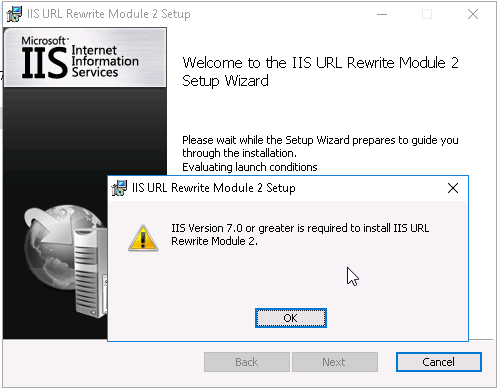
When you start to play with Windows Server 2016 and IIS 10, you'll get an error when you try to install the IIS URL Rewrite Module in IIS. The error occurs because the URL Rewrite Module installer contains an invalid version check for the IIS being used. Here is how to install IIS URL Rewrite Module 2 in IIS 10...
Useful
Last updated:
Blacklist check script written in PowerShell, to easily lookup an IP address status in various blacklists (DNSBLs, RBLs)

Windows Server
Last updated:
The AppCmd.exe command is your one-stop-shop for administering Windows Server IIS web servers. In combination with WinRM it is your Swiss Army knife for your daily routine. This post introduces appcmd and provides you with a lot of helpful appcmd examples.
Codebase
Last updated:
Get the current number of active FTP client connections on your Windows Server IIS FTP Service using the Get-Counter cmdlet and the Microsoft FTP Service Current NonAnonymous Users performance counter.
Codebase
Last updated:
Windows PowerShell is an important tool in Windows Server for administrators. You can use PowerShell for Windows Server administration, software installation, automation, and shell/command-prompt scripting.

Windows Server
Last updated:
Regular maintenance of a Windows computer significantly improves performance and reliability. Manual execution of maintenance tasks complements the automatic maintenance already scheduled by Windows, giving users greater control over how system resources are managed and how repairs are conducted. This article explains how to use tools such as SFC, DISM, CHKDSK, and disk defragmentation.

Useful
Last updated:
OpenSSL comes in handy when you need to generate passwords or random strings. For example for system accounts and services. In this short post I'll give you a quick example on how to generate random passwords with OpenSSL in Linux (Bash), Windows and PHP.
Codebase
Last updated:
Verifying PowerShell exit code using the $? operator or $LASTEXITCODE is how you find out whether an external command was executed successfully in PowerShell. The operator $? contains True if the last operation succeeded and False otherwise.
Windows Server
Last updated:
Learn how to get the Hyper-V guest virtual machine serial number with PowerShell, this is ideal for automated deployments with WDS or docs

Windows Server
Last updated:
Tunnel Remote Desktop over SSH with PuTTY: Have you ever been in a situation where you needed to perform remote administration on a Windows Server, and the RDP port 3389 is blocked on a firewall? You can tunnel RDP over SSH with PuTTY 🙂
Windows Server
Last updated:
Schedule a PowerShell script to monitor local services in your Windows Server environment
Windows Server
Last updated:
To get and set File Server Resource Manager NTFS quota you now have to use PowerShell FileServerResourceManager cmdlets. It's pretty easy to get directory information with Get-FsrmQuota and change dirquota.exe using Set-FsrmQuota.
Windows Server
Last updated:
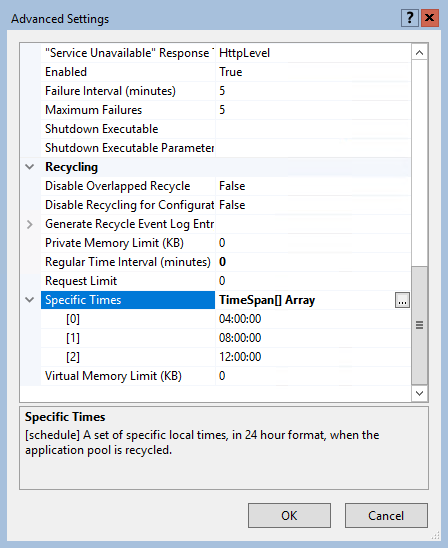
By default, an IIS application pool (or "AppPool") recycles on a regular time interval of 1740 minutes, or 29 hours. One reason for this time interval is that application pools don't recycle at the same moment every day (every day at 07.00 for example).

Windows Server
Last updated:
Here is how to install software packages during a Windows Deployment Services (WDS) deployment, without Microsoft Deployment Workbench (available in the Microsoft Deployment Toolkit, or MDT).

Windows Server
Last updated:
Utilize your cmd.exe or PowerShell command-line and use Deployment Image Servicing and Management (DISM) to clean up the Windows Component Store (WinSxS) in Windows Server.