
WordPress
Last updated:
Protect WordPress from brute-force XML-RPC attacks
How to protect your WordPress from brute-force XML-RPC attacks, because the WordPress XML-RPC API has been under attack for many years now.

Infrastructure Security Hardening & Protocols Guide
Welcome to the security and compliance hub on saotn.org. In modern enterprise environments, securing endpoints, transport layers, and web infrastructure is an ongoing necessity. A single misconfiguration can expose internal architectures or leave legacy protocols open to exploitation.
This section is dedicated to practical, hands-on infrastructure security hardening. From implementing defensive HTTP response headers and fine-tuning SSL/TLS handshakes to managing secure authentication mechanisms like OpenSSH and Active Directory, these guides provide actionable steps to mitigate risks and secure your production environments.
Key Security & Hardening Focus Areas
To help you audit and harden your environment, our core security resources are grouped by technical implementation:
Web Server Hardening & Transport Security: Minimize your attack surface and protect data in transit. Eliminate information leakage by learning how to remove the IIS Server version HTTP Response Header, and enforce encrypted connections by enabling HTTP Strict-Transport-Security (HSTS) on IIS.
SSL/TLS Handshake Validation: Master the tools required to verify your cryptographic boundaries. Leverage our comprehensive OpenSSH and OpenSSL Cheat Sheet to audit handshakes, test cryptographic protocols, and troubleshoot active directory certificate integrations.
Secure Authentication & Access Control: Upgrade your identity and access management. Move away from weak passwords by configuring YubiKey support in OpenSSH for Windows 11 or securely retrieving public keys directly from your directory services.
Network Edge & Endpoint Defense: Control traffic at the perimeter. Use automated scripting to dynamically manage ingress and egress rules, or isolate legacy systems using secure network tunneling protocols.
Browse the chronological archive below for step-by-step guides on patching vulnerabilities, troubleshooting credential delegation issues, and implementing robust security baselines across your Windows Server fleet.
WordPress
Last updated:
How to protect your WordPress from brute-force XML-RPC attacks, because the WordPress XML-RPC API has been under attack for many years now.

Windows Server
Last updated:
In this post I address four (4) important actionable security measures for your servers running Windows Server (AD DS, DFS, IIS) and RDP.

Windows Server
Last updated:
Disable SMBv1 on WIndows if you haven't done so yet. Prevent Petya / NotPetya, WannaCrya / Wanacryp0r randsomware spreading through your network.

WordPress
Last updated:
Check WordPress integrity and verify WordPress Core files' md5 checksums against WordPress' checksums API, using this standalone PHP file.
WordPress
Last updated:
This post describes the Akal premium WordPress theme Cross Site Scripting (XSS) vulnerability. If you use this theme, delete it immediately!

Windows Server
Last updated:
Learn to protect your WordPress website with this web.config file on Windows Server IIS. Block IP addresses, bad bots, query string sequences
Windows Server
Last updated:
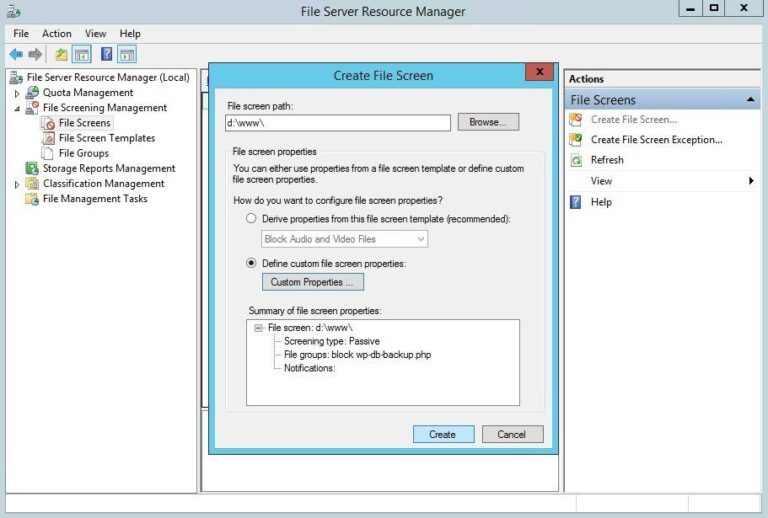
Using Windows Server File Server Resource Manager‘s File Screens you can block vulnerable WordPress plugins from being uploaded to your IIS web server. In the following example, you'll learn how to block WP DB Backup plugin system-wide on Windows Server, read on…

Useful
Last updated:
OpenSSL comes in handy when you need to generate passwords or random strings. For example for system accounts and services. In this short post I'll give you a quick example on how to generate random passwords with OpenSSL in Linux (Bash), Windows and PHP.

WordPress
Last updated:
A web.config file for WordPress on Windows Server IIS. Are you having trouble with your web.config? Here is mine 🙂

Windows Server
Last updated:
Tunnel Remote Desktop over SSH with PuTTY: Have you ever been in a situation where you needed to perform remote administration on a Windows Server, and the RDP port 3389 is blocked on a firewall? You can tunnel RDP over SSH with PuTTY 🙂

WordPress
Last updated:
With thousands spam reactions, disabling (and removing) WordPress comments is often the only way to go. Here is how to disable WordPress comments in both the WordPress Dashboard interface and in your MySQL / MariaDB database.

Web applications
Last updated:
Exploit PHP's mail() function for remote code execution. Apparently, if you are able to control the 5th parameter of the mail() function ($options), you have the opportunity to execute arbitrary commands.

WordPress
Last updated:
How to identify, block, mitigate and leverage xmlrpc.php scans, brute-force, and user enumeration attacks on WordPress sites... Secure WordPress xmlprc.php interface and reduce service disruption.
Windows Server
Last updated:
Windows Server IIS loves to tell the world that a website runs on IIS. It does so with the "Server:" header in the HTTP response, as shown below. In this post I'll show you how to remove HTTP response headers in Windows Server IIS. You don't want to give hackers too much information about your servers, right?.
Windows Server
Last updated:
Sometimes it's important to remove (or hide) the file extension of scripts you use. Security by obscurity might be that reason, if you don't want others to know what script language you are using for your website, or for static site hosts.

Codebase
Last updated:
Investigate SMTP authentication issues like a boss! When using TLS encrypted SMTP connections, it's always handy if you are able to create a SMTP logon credentials and test SMTP authentication over a TLS/StartTLS connection. Preferably from your command-prompt.

GNU/Linux
Last updated:
MySQL string comparison functions for MD5 and SHA1 hashes; how to calculate MD5 and SHA1 hashes in MySQL and let MySQL do the calculations for you.

WordPress
Last updated:
Delete WordPress spam comments and meta data in your database, easily with phpMyAdmin or mysql cli. Keep your WordPress database lean & mean!

WordPress
Last updated:
The less spammers hit your WordPress blog, the better your blog performs, is one of my opinions. A second is, the less unnecessary plugins you use on your WordPress blog, the better. So, a little while ago I decided to remove plugins like Stop Spammer Registration Plugin and do its work myself.

Windows Server
Last updated:
How to use GnuWin32 ported tools like grep.exe and find.exe for forensic log file analysis in Windows Server. Find webshells and backdoors in websites, check visitor's IP addresses or hits to backdoor/webshell files in IIS log files easy. Command-line log analysis in Windows Server, search for Joomla-, WordPress-, Drupal- and PHP- malware & backdoors in your website with grep and find.