
Find vulnerable WordPress plugin versions fast using PowerShell
Find vulnerable WordPress plugins fast using PowerShell on Windows Server and IIS
Technical SysOps blog, where topics include Sysadmin, DevOps, computers, servers, web, MySQL, database, virtualization, optimization and security
Technical SysOps blog, where topics include Sysadmin, DevOps, computers, servers, web, MySQL, database, virtualization, optimization and security
Find vulnerable WordPress plugins fast using PowerShell on Windows Server and IIS

WordPress core-, plugin- and theme updates sometimes fail because of enabled opcode caches in PHP. Popular PHP opcode caches are OPcache, WinCache and APC. This little WordPress Must Use Plugin tries to flush opcode caches. Making your live a bit easier when updating WordPress Core, Plugins and Themes.

Schedule WordPress database optimization with WP-Cron.

Learn to protect your WordPress website with this web.config file on Windows Server IIS. Block IP addresses, bad bots, query string sequences
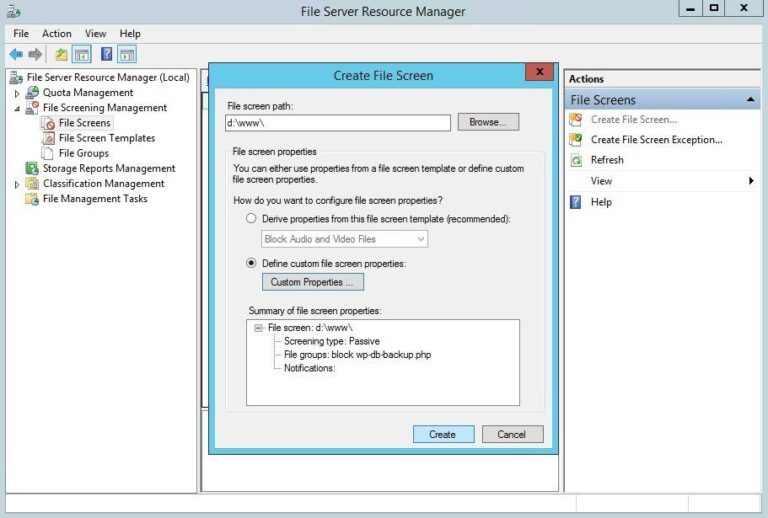
Using Windows Server File Server Resource Manager‘s File Screens you can block vulnerable WordPress plugins from being uploaded to your IIS web server. In the following example, you’ll learn how to block WP DB Backup plugin system-wide on Windows Server, read on…

Send outgoing mail over authenticated SMTP using TLS, in PHP, ASP and ASP.NET. Send email securely from your website. Ready to use examples!

With thousands spam reactions, disabling (and removing) WordPress comments is often the only way to go. Here is how to disable WordPress comments in both the WordPress Dashboard interface and in your MySQL / MariaDB database.

How to identify, block, mitigate and leverage xmlrpc.php scans, brute-force, and user enumeration attacks on WordPress sites... Secure WordPress xmlprc.php interface and reduce service disruption.

On IIS, Contact Form 7 captcha has one HUGE disadvantage: temporary captcha files placed in wp-content/uploads/wpcf7_captcha, are not automatically removed. Here is how to remove Contact Form 7 temporary captcha files on IIS…

Change file attributes with PHP chmod to make files read-only or normally accessible on Windows Server IIS.

Block and filter unwanted web HTTP traffic with blocklists, on both IIS and Apache. Protect your website easily with this PHP blocklist class. Create your own HTTP web blocklist filter.