In my pursuit for a basic authentication alternative in IIS, other than the built-in Basic Authentication module or Helicon Ape, I came across Devbridge AzurePowerTools. It’s apparently one of few HTTP managed modules for IIS that enables HTTP Basic Authentication with virtual user support.
Devbridge.BasicAuthentication is a HTTP Basic Authentication managed module for IIS 10 with virtual users support in Windows Server IIS. Sweet 🙂
Well, it’s not actually built-in, but I see this installed very often. For me, two main disadvantages of using the native IIS Basic authentication module are:
- you must disable Anonymous authentication, meaning no one can access your website without authentication, even if you wish to secure only a small portion.
- the Basic authentication role service only supports users and roles that are created in Active Directory or IIS Manager – there is no ‘virtual user’ support like Apache mod_authn_file provides.
Not a disadvantage, but very important for HTTP Basic Authentication is encryption. You must use SSL encryption to secure user account information transmitted across the internet.
For many years I’ve used Helicon Ape. It provides mod_auth_basic support for IIS through a managed module. For me, Helicon Ape has two major disadvantages:
- it uses a lot of memory… Really a lot. Disabling Helicon Ape can save ~60% RAM per worker process.
- Helicon Ape is old, and hasn’t been updated for years.
So along came Devbridge.BasicAuthentication by Devbridge.
Devbridge.BasicAuthentication
HTTP Basic authentication for IIS made easy.
All you have to do to make this managed HTTP module work in IIS is simple:
- download the project from Devbridge’s GitHub
- start an empty web project in Visual Studio
- add the file
BasicAuthentication.csto your project, and its config files - build and compile it to a DLL
- create a configuration file
Config\basicAuthentication.config - configure your web.config configuration file
- publish your files
<?xml version="1.0"?>
<configuration>
  <configSections>
    <section name="basicAuth" type="Devbridge.BasicAuthentication.Configuration.BasicAuthenticationConfigurationSection" />
  </configSections>
  <appSettings>
    <add key="BasicAuthEnabled" value="true"/>
  </appSettings>
  <basicAuth configSource="Config\basicAuthentication.config" />
  <system.webServer>
    <modules>
      <add name="MyBasicAuthenticationModule" type="Devbridge.BasicAuthentication.BasicAuthenticationModule"/>
    </modules>
    <validation validateIntegratedModeConfiguration="false"/>
  </system.webServer>
</configuration>
If you can add the assembly manifest to the BasicAuthenticationModule.cs file, you should be able to compile it as a single file HTTP module: C:\Windows\Microsoft.NET\Framework\v4.0.30319\csc.exe /out:BasicAuthentication.dll /t:module c:\Users\jan\dev\Devbridge.BasicAuthentication\BasicAuthenticationModule.cs
You add your username and password (more than one combination is supported) in Config\basicAuthentication.config. You configure excludes in this file too, matching requests are excluded from authentication:
<basicAuth>
  <credentials>
    <add username="test" password="test"/>
    <add username="foobar" password="barf00"/>
  </credentials>
  <!-- url and verb can specified as regular exprenssion. Empty or not defined value means that all values are mathched.-->
  <excludes>
    <!-- exclude POST requests to URLs starting with /home; other requests (GET to /home/index, POST to /account/login) should be authenticated -->
    <add url="^/home(.*)" verb="post" />
    <!-- exclude POST requests to all URLs; other requests (GET to /home/index, DELETE to /account/123) should be authenticated -->
    <add url="" verb="post" />
    <!-- exclude all requests to URLs starting with /allow; other requests should be authenticated -->
    <add url="^/allow(.*)" verb="" />
    <!-- exclude all requests to URLs starting with /home; rules specified below overwrite previous rules with the same url pattern.  -->
    <add url="^/home(.*)" verb="" />
  </excludes>
</basicAuth>
More information about this module is available in their blog post Basic Authentication for Windows Azure Websites (Wayback Machine link). If you like this managed module for basic authentication in IIS, fork the project and (try to) improve is. I’m sure Devbridge wouldn’t mind.
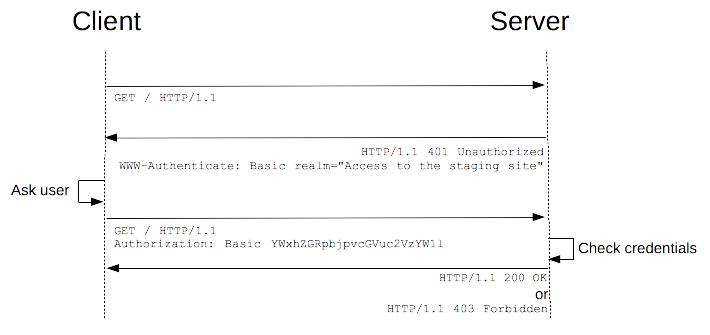
developer.mozilla.org explains the HTTP authentication schema.

Did you like this post?
Please take a second to support Sysadmins of the North and donate! ❤️
Your generosity helps pay for the ongoing costs associated with running this website like coffee, hosting services, library mirrors, domain renewals, time for article research, and coffee, just to name a few. ❤️
Summary
- The article discusses alternatives to the built-in Basic Authentication module in IIS, highlighting Devbridge AzurePowerTools as a solution.
- Devbridge.BasicAuthentication offers HTTP Basic Authentication with virtual user support, unlike IIS’s native module which lacks this feature.
- Using Devbridge.BasicAuthentication involves downloading the project, adding necessary files, and configuring it for your IIS environment.
- The-native IIS Basic Authentication module requires disabling Anonymous authentication and lacks flexibility for virtual users.
- The author critiques alternatives like Helicon Ape for high memory usage and outdated support.