

Zabbix can harnas the powers of WMI (Windows Management Instrumentation) to query the Windows system for data. In Zabbix you use wmi.getall for this. Here is a small introduction to query the number of running w3wp.exe processes per application pool in Zabbix so you can start monitoring Microsoft Windows Server IIS with Zabbix.
In this example I’ll be using a Plesk server running IIS 10.0.
About Windows Management Instrumentation
Windows Management Instrumentation (WMI) is the infrastructure for management data and operations on Windows-based operating systems. You can write WMI scripts or applications to automate administrative tasks on remote computers but WMI also supplies management data to other parts of the operating system and products, for example System Center Operations Manager, formerly Microsoft Operations Manager (MOM), or Windows Remote Management (WinRM).
As said, the item to use in the discovery rule is wmi.getall (Windows-specific item keys). I want to use this to query the number of running w3wp.exe processes for a particular user. You may or may not know Plesk uses local users for hosting web sites in IIS, where we’d normally use anonymous IUSR’s created in Active Directory, or ApplicationPoolIdentity.
The Plesk local users are all start with IWPD_, and this makes it easy to construct a WMI query to list them all:
Get-CimInstance -Query "select Name from Win32_UserAccount WHERE Name like 'IWPD_%'" -Namespace root\CIMV2This is easily added to a discovery_rule in your Zabbix Windows Server IIS template:
<key>wmi.getall[root\CIMV2, select Name from Win32_UserAccount WHERE Name like 'IWPD_%']</key>The macro value is what you use in your item_prototype as parameter for proc.num:
<key>proc.num[w3wp.exe,{#IUSR}]</key>This makes a complete Zabbix discovery rule:
<discovery_rules>
<discovery_rule>
<name>IWPD-gebruiker discovery</name>
<type>ZABBIX_ACTIVE</type>
<key>wmi.getall[root\CIMV2, select Name from Win32_UserAccount WHERE Name like 'IWPD_%']</key>
<delay>15m</delay>
<filter>
<evaltype>AND</evaltype>
<conditions>
<condition>
<macro>{#IUSR}</macro>
<value>{$IIS.IUSR.NOT_MATCHES}</value>
<operator>NOT_MATCHES_REGEX</operator>
<formulaid>A</formulaid>
</condition>
<condition>
<macro>{#IUSR}</macro>
<value>{$IIS.IUSR.MATCHES}</value>
<formulaid>B</formulaid>
</condition>
</conditions>
</filter>
<item_prototypes>
<item_prototype>
<name>IIS: AppPool {#IUSR} total number of w3wp.exe processes</name>
<key>proc.num[w3wp.exe,{#IUSR}]</key>
<history>1w</history>
<trends>9125d</trends>
<application_prototypes>
<application_prototype>
<name>{#IUSR}</name>
</application_prototype>
</application_prototypes>
</item_prototype>
<item_prototype>
<name>IIS: AppPool {#IUSR} total number of php-cgi.exe processes</name>
<key>proc.num[php-cgi.exe,{#IUSR}]</key>
<history>1w</history>
<trends>9125d</trends>
<application_prototypes>
<application_prototype>
<name>{#IUSR}</name>
</application_prototype>
</application_prototypes>
</item_prototype>
</item_prototypes>
<lld_macro_paths>
<lld_macro_path>
<lld_macro>{#IUSR}</lld_macro>
<path>$.Name</path>
</lld_macro_path>
</lld_macro_paths>
</discovery_rule>
</discovery_rules>
<!-- ... -->
<macro>
<macro>{$IIS.IUSR.NOT_MATCHES}</macro>
<value><CHANGE_IF_NEEDED></value>
<description>This macro is used in IWPD-gebruiker discovery. Can be overridden on the host or linked template level.</description>
</macro>
<macro>
<macro>{$IIS.IUSR.MATCHES}</macro>
<value>.+</value>
<description>This macro is used in IWPD-gebruiker discovery. Can be overridden on the host or linked template level.</description>
</macro>
<!-- ... -->This is how it eventually looks:
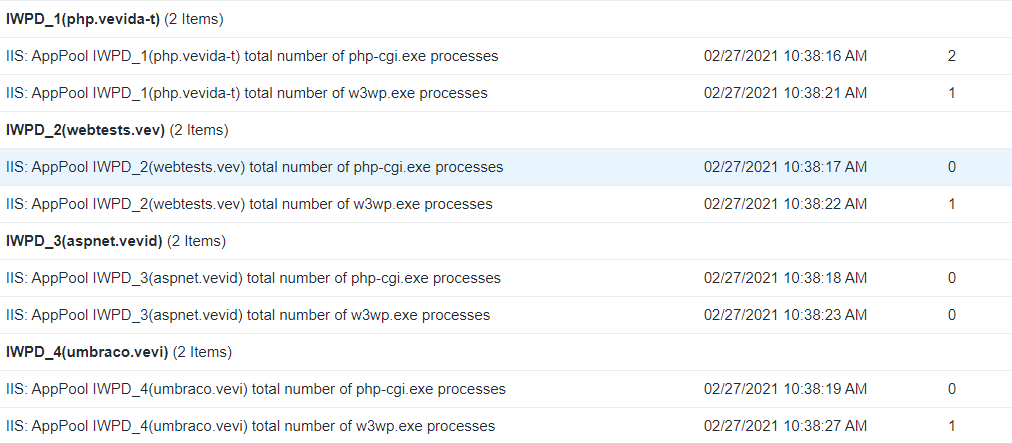
As you can see, I added php-cgi.exe as well.
Bonus: Want to count all w3wp.exe processes as a total? Use proc.num in your template item:
<!-- ... -->
<item>
  <name>Total number of w3wp.exe processes</name>
  <key>proc.num[w3wp.exe]</key>
  <history>1w</history>
  <trends>9125d</trends>
  <applications>
    <application>
      <name>Processes</name>
    </application>
  </applications>
</item>
<!-- ... -->
This was part 1 in, hopefully, a series of posts with interesting pieces of Zabbix monitoring for Windows Server and IIS. Let me know what you thought about this article, and what you use to monitor your web servers.
Summary
- Zabbix uses WMI to query Windows systems, utilizing the wmi.getall function.
- This article focuses on monitoring the number of running w3wp.exe processes per application pool in Zabbix on a Plesk server with IIS 10.0.
- Construct a WMI query for Plesk local users, which all start with IWPD_.
- Create a discovery rule in your Zabbix IIS template to count the running processes effectively.
- This is part 1 of a series on Zabbix monitoring for Windows Server and IIS.