
What are 4 important security measures for Windows Server & IIS 10?
In this post I address four (4) important actionable security measures for your servers running Windows Server (AD DS, DFS, IIS) and RDP.
Technical SysOps blog, where topics include Sysadmin, DevOps, computers, servers, web, MySQL, database, virtualization, optimization and security
Technical SysOps blog, where topics include Sysadmin, DevOps, computers, servers, web, MySQL, database, virtualization, optimization and security
In this post I address four (4) important actionable security measures for your servers running Windows Server (AD DS, DFS, IIS) and RDP.
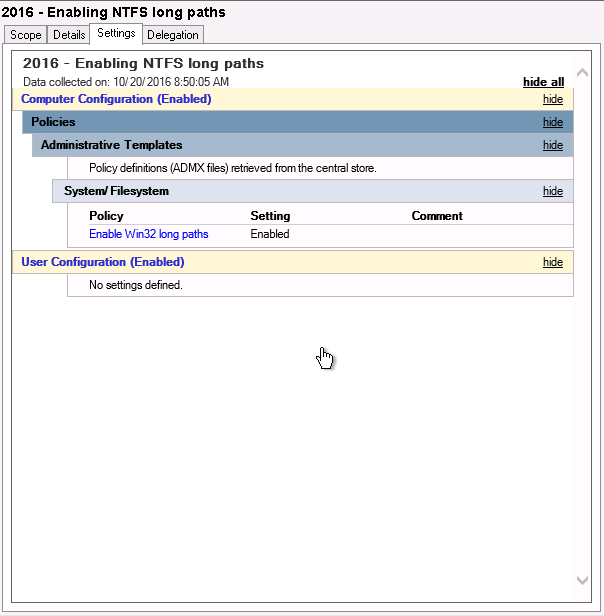
Windows Server 2016 was finally released last week, meaning we can finally lift the idiotic 260 characters limitation for NTFS paths. For this, you use a GPO or Group Policy Object in Windows Server.

Gzip compress and serve WP-Super-Cache or Cache Enabler static HTML files, to supercharge your WordPress blog!

In this post I provide you with 5 ways to cleanup files and free up disk space in Windows Server 2016 (and older / newer Windows Server version), without using the Disk Cleanup Utility. Reclaim lots of lost gigabytes easy. Disk space usage is still an issue in Windows Server.
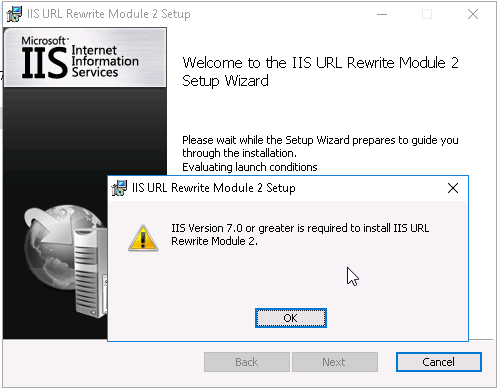
When you start to play with Windows Server 2016 and IIS 10, you'll get an error when you try to install the IIS URL Rewrite Module in IIS. The error occurs because the URL Rewrite Module installer contains an invalid version check for the IIS being used. Here is how to install IIS URL Rewrite Module 2 in IIS 10...

The AppCmd.exe command is your one-stop-shop for administering Windows Server IIS web servers. In combination with WinRM it is your Swiss Army knife for your daily routine. This post introduces appcmd and provides you with a lot of helpful appcmd…

Get the current number of active FTP client connections on your Windows Server IIS FTP Service using the Get-Counter cmdlet and the Microsoft FTP Service Current NonAnonymous Users performance counter.

Learn to protect your WordPress website with this web.config file on Windows Server IIS. Block IP addresses, bad bots, query string sequences

Fix for IIS URL Rewrite Module error "Rewrite Module error: Expression contains a repeat expression"
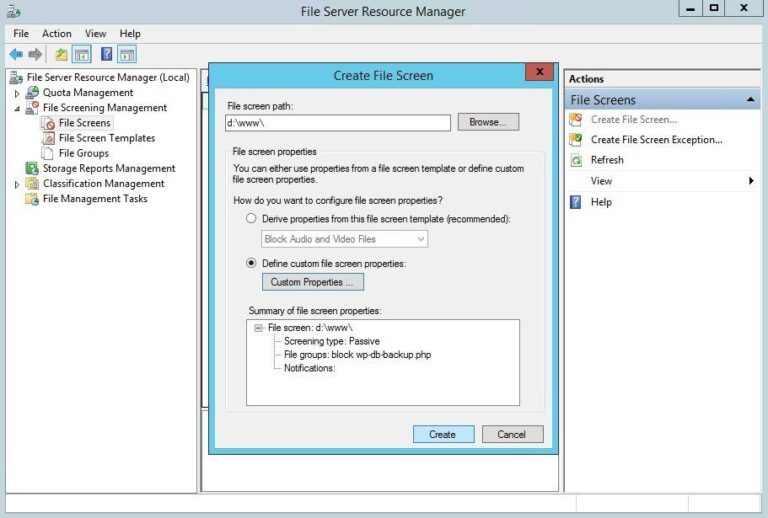
Using Windows Server File Server Resource Manager‘s File Screens you can block vulnerable WordPress plugins from being uploaded to your IIS web server. In the following example, you’ll learn how to block WP DB Backup plugin system-wide on Windows Server, read on…

The Baidu spider (BaiduSpider user agent) can be a real pain to block, especially since it does not respect a robots.txt as it should. This post shows you how to block Baidu Spider bot, using IIS URL Rewrite Module based on its User-Agent string.

Do you host your WordPress website on Windows Server IIS? And are you having trouble with your web.config? Here is mine :)

Set up HTTP Strict-Transport-Security (HSTS) response header in Windows Server IIS 10, here is some more technical information about HSTS in IIS, and other security headers...
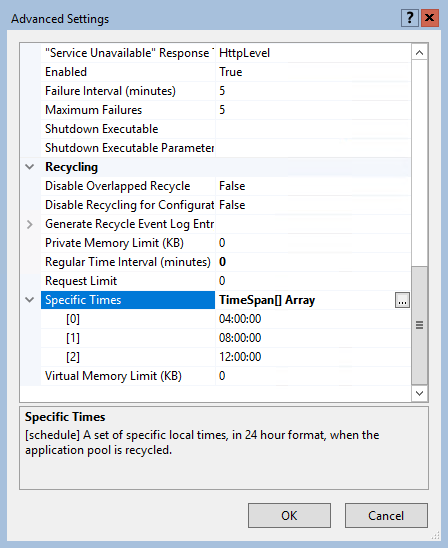
By default, an IIS application pool (or "AppPool") recycles on a regular time interval of 1740 minutes, or 29 hours. One reason for this time interval is that application pools don't recycle at the same moment every day (every day at 07.00 for example).

Learn how to optimize PHP performance by checking and setting PHP realpath_cache_size. The realpath_cache_size size represents the total number of bytes in the path strings stored, plus the size of the data associated with the cache entry
In this article you'll learn how to start all stopped application pools that have the ApplicationPool.AutoStart property set to $True using AppCmd.exe or PowerShell. This is something you often or occasionally have to perform on various servers, for example when an application pool hangs.
Windows Server IIS loves to tell the world that a website runs on IIS. It does so with the "Server:" header in the HTTP response, as shown below. In this post I'll show you how to remove HTTP response headers in Windows Server IIS. You don't want to give hackers too much information about your servers, right?.

Easily enable support for the WebSocket protocol on Windows Server IIS by installing the Web-WebSockets feature using PowerShell. Learn how to install WebSocket Protocol support in Windows Server IIS 8.0.
Sometimes it's important to remove (or hide) the file extension of scripts you use. Security by obscurity might be that reason, if you don't want others to know what script language you are using for your website, or for static site hosts.
Gzip compression conflicts with IIS Outbound Rules resulting in HTTP 500.52 URL Rewrite Module Error. Here is how to resolve this.